
Life Science
Placement Information
Placement Process
One critical factor for restful learning is the proper placement of students. If you are unsure which level is the best fit for your student, reach out to the instructor you are considering. Once registered, anticipate contact regarding placement evaluations from instructors by May 15th and throughout the summer. Students must be enrolled to enter the placement process. Early placement exams may allow time for tutoring or additional review based on the outcomes. See more about placement evaluations in our Student-Parent Handbook.
Novare Science Placement
If placement evaluation is needed, please anticipate contact from instructors by May 15th and throughout the summer. Students must be enrolled in a course to receive a placement assessment.
Learn more about the Novare Science placement.
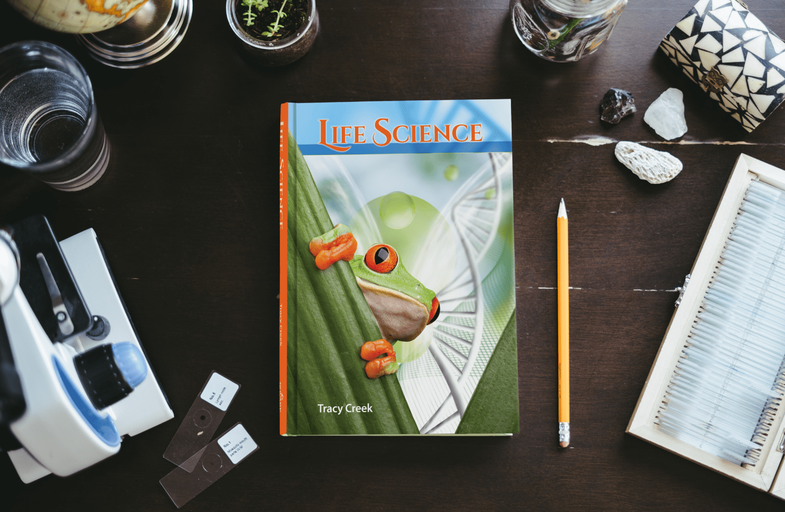
Required Materials:
Books and supplies are not included in the purchase of the course. These resources are listed to help inform your decision-making as you make course selections and build your course schedule. Please reach out to the instructor if you have any questions about materials.
- Novare Life Science
- The Apprentice's Companion for Life Science
- Notebook paper
- A binder or binder section devoted to the course

Mrs. Danielle Bartko
[email protected]Danielle Bartko is an experienced Math and Science teacher, and Orthodox Church Cantor and Choir Director. She taught in public schools and a Montessori based Orthodox private school. She has served the American Carpatho-Russian Orthodox Diocese as a Cantor and Choir Director, and the Orthodox Church in America as a Choir Director. She spent countless summers at Camp Nazareth, first as a camper, and later as a counselor and chant teacher.
She holds degrees in Biology and Music from Lafayette College, and Secondary Teacher Certification from DeSales University. She has taught grades 5-12, and currently homeschools her children. She has experience in a variety of teaching methods, and has taught students with diverse academic needs. She is a lifelong learner, and has enjoyed growing and changing as an educator over the years. Her goal is to inspire her students to become lifelong learners as well.
Her Liturgical music education comes from a variety of coursework in Orthodox Music and Choral Directing. She has taken classes through Christ the Saviour Seminary and the OCA Liturgical Music Department, and independent study with Very Rev. Protopresbyter Michael Rosco and Professors Paul Hilko, George Hanas, Andrew Talarovich, and Jerry Jumba. Whenever she travels and visits a church, she will sneak into the choir loft, wait for an invitation to sing with the choir, and then ask for copies of good music to keep as a souvenir.
She grew up in New Jersey, but now lives in Pittsburgh PA with her husband and two young daughters. When she is not homeschooling her children or teaching classes, she enjoys gardening, jigsaw puzzles, SRS Iconography classes, visiting with friends and family, and going to the beach.
.png?cache=false)
Mrs. Emily Cook
[email protected]Emily Cook is a lifelong lover of literature, seeking insight into the complex beauty of the world and the One who made it through well-written stories. Emily taught full-time for five years at a classical Christian school in Kailua, Hawaii, developing courses for the growing secondary school. While she primarily taught literature classes, she also taught logic, rhetoric, and drama.
Emily holds a B.A. in English from Trinity University in San Antonio, TX. Trinity University is also where she met her dear husband Joel, who she married in 2009 just after graduating. Emily and Joel live in San Antonio and have four lively, hilarious, and wonderful kids. During her leisure time, you can often find Emily enjoying a meal with friends, spending time outside, or reading aloud to her children the tales she loved as a child (with voices, of course!).

Mrs. Sarah Boudreaux
[email protected]Having been homeschooled alongside her five siblings, Sarah developed a deep appreciation for the freedom that comes with learning at home, fostering a greater openness to exploration and curiosity. Spending much of her early life outdoors, whether in the woods or climbing trees, she developed a deep love for the natural world. This passion for nature guided her academic focus in college at the University of Southern Mississippi, where she earned her Bachelor's degree in Geography, with a minor in Biology. She also engaged in fish research with USM, which further strengthened her enthusiasm for studying and preserving the environment. Her hobby of sketching and painting often reflects her love for nature, frequently depicting plants and animals. In July, Sarah will be newly married and relocating to Louisiana with her husband, where they plan to homeschool their future children. She is eager to start a new chapter in her life and is excited to engage with students, fostering an environment where they can develop a greater love and appreciation for God's creation.
 Computer: You will
need a stable, reliable computer, running with a processor with a speed of 1 GHz or better
on one of the following operating systems: Mac OS X with Mac OS 10.7 or later; Windows 8,
7, Vista (with SP1 or later), or XP (with SP3 or later). We do not recommend using an
iPad or other tablet for joining classes. An inexpensive laptop or netbook would be much
better solutions, as they enable you to plug an Ethernet cable directly into your computer.
Please note that Chromebooks are allowed but not preferred, as they do not support certain
features of the Zoom video conference software such as breakout sessions and annotation,
which may be used by our teachers for class activities.
Computer: You will
need a stable, reliable computer, running with a processor with a speed of 1 GHz or better
on one of the following operating systems: Mac OS X with Mac OS 10.7 or later; Windows 8,
7, Vista (with SP1 or later), or XP (with SP3 or later). We do not recommend using an
iPad or other tablet for joining classes. An inexpensive laptop or netbook would be much
better solutions, as they enable you to plug an Ethernet cable directly into your computer.
Please note that Chromebooks are allowed but not preferred, as they do not support certain
features of the Zoom video conference software such as breakout sessions and annotation,
which may be used by our teachers for class activities.
High-Speed Internet Connection:
You will also need access to high-speed Internet, preferably accessible via Ethernet
cable right into your computer. Using Wi-Fi may work, but will not guarantee you the optimal
use of your bandwidth. The faster your Internet, the better. We recommend using a connection
with a download/upload speed of 5/1 Mbps or better. You can test your Internet connection here.
Webcam: You may
use an external webcam or one that is built in to the computer. Webcam Recommendations:
Good (PC only) | Best (Mac and PC)
Headset: We recommend
using a headset rather than a built-in microphone and speakers. Using a headset reduces the
level of background noise heard by the entire class. Headset Recommendations: USB | 3.5mm
Zoom: We use a web
conferencing software called Zoom for our classes, which enables students and teachers to
gather from around the globe face to face in real time. Zoom is free to download and easy
to use.  To
download Zoom:
To
download Zoom:
- Visit zoom.us/download.
- Click to download the first option listed, Zoom Client for Meetings.
- Open and run the installer on your computer.
- In August, students will be provided with instructions and a link for joining their particular class.
Scanner: In this
class, students frequently submit homework assignments by scanning pages from their workbooks.
Students and/or their parents should have easy access to a scanner and the ability to use it.
Step 1
Step 2
Step 3
Step 4
Explore our courses!
First, read the available course descriptions, noting prerequisites, target grades, and course objectives. If you think your student is prepared for the course, go ahead and register. After registration, a placement assessment may be provided to students, depending on the course and the student's previous enrollment with Scholé Academy. Registration is finalized when the student's placement assessment has been returned by the course instructor with placement confirmation.
All Courses | By Grade
Read the Student-Parent Handbook.
Please take careful note of our teaching philosophy, our technology requirements, our school policies, the parent agreement, and the distinctions between our grade levels.
Double-check the course section dates and times.
Make sure they don't conflict with other activities in your schedule or other courses you are purchasing. Our system will not catch double-bookings!
You're ready to add course selections to your cart!
Our Assistant to the Principal will be in touch with you after your enrollment to help you with next steps, including any placement evaluations that may be required for your course selections.
This registration will be finalized when the student's placement assessment has been returned by the course instructor with placement confirmation.